Practice certification exams the way you'll sit them.
Timed practice tests, all-or-nothing scoring, and full explanations once you submit.
Certifications
Practice that feels like exam day
Most certification exams are long, timed and full of scenario questions where two answers look right. The best way to get ready is to practice under the same conditions: the same pace, the same question styles, and no peeking at the answer until you're done. Then go through every explanation, including the questions you got right by luck.
Exam Ascent gives you exactly that for each exam it covers, plus a study mode for when you'd rather learn as you go.
Two ways to practice
- Exam mode: full-length simulations drawn at random from the exam's question bank and timed at the real exam's pace. Mark questions for review, jump around with the question navigator, pause if life interrupts, and see your score and every explanation when you submit.
- Study mode: no timer. Check each answer as you go and read its explanation straight away. Study sessions are kept out of your exam scores, so your progress chart shows how you do under exam conditions.
What you get for every exam
- Explanations for every option: why the right answer is right, and why each of the others is wrong.
- All-or-nothing scoring: a multiple-response or matching question only counts when every part of your answer is right, so your score never flatters you.
- Exam-day tools: mark questions for review, jump around with the question navigator, cross out options you've ruled out, and pause when you need to.
- Keep going if your connection drops: answers are kept on your device and saved as soon as you're back online, even if you close the tab in the meantime.
- Progress charts: your score and your time per question across tests, each with a trend line, so you can see whether you're getting more accurate and faster.
- Review that targets your gaps: after a test, filter the review to just the questions you got wrong.
- Short sessions too: quick sets of 10 or 20 questions, or the whole bank in 50-question blocks.
- Any device: works in the browser on a phone, tablet or computer, with nothing to install.
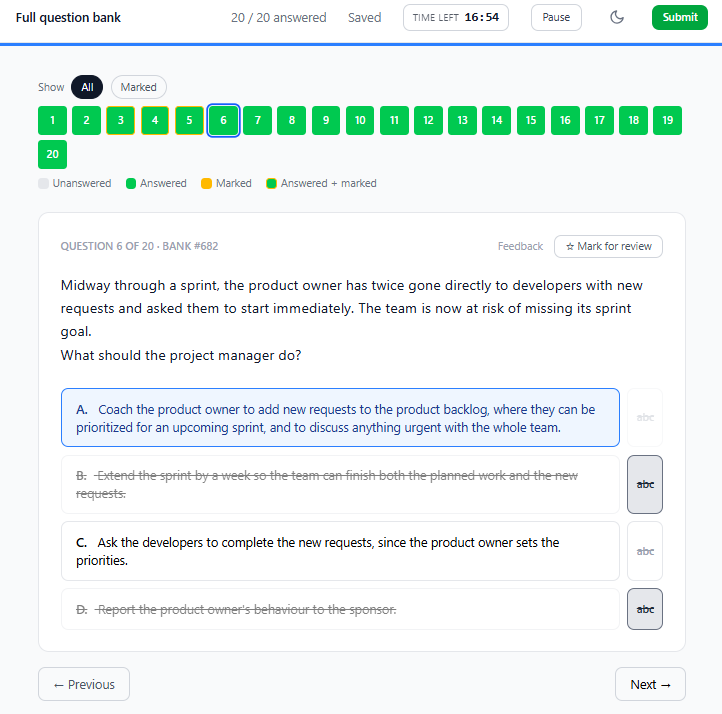
Exam mode: the clock, the question navigator, marked questions and crossed-out options.
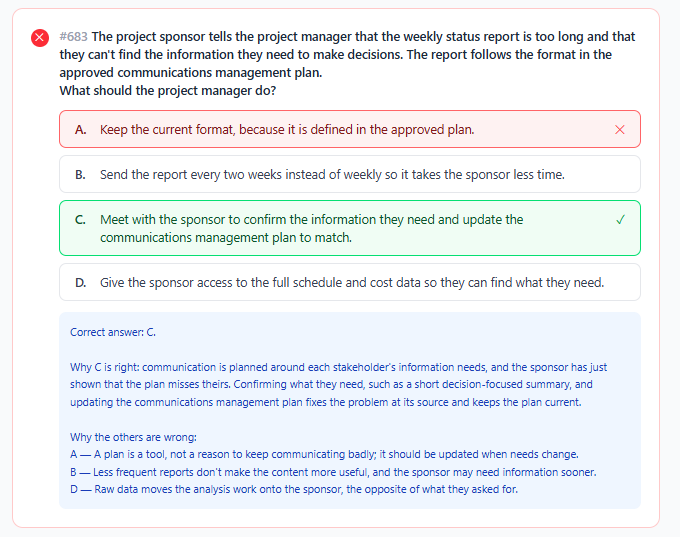
After you submit: your answer, the correct one, and why each option is right or wrong.
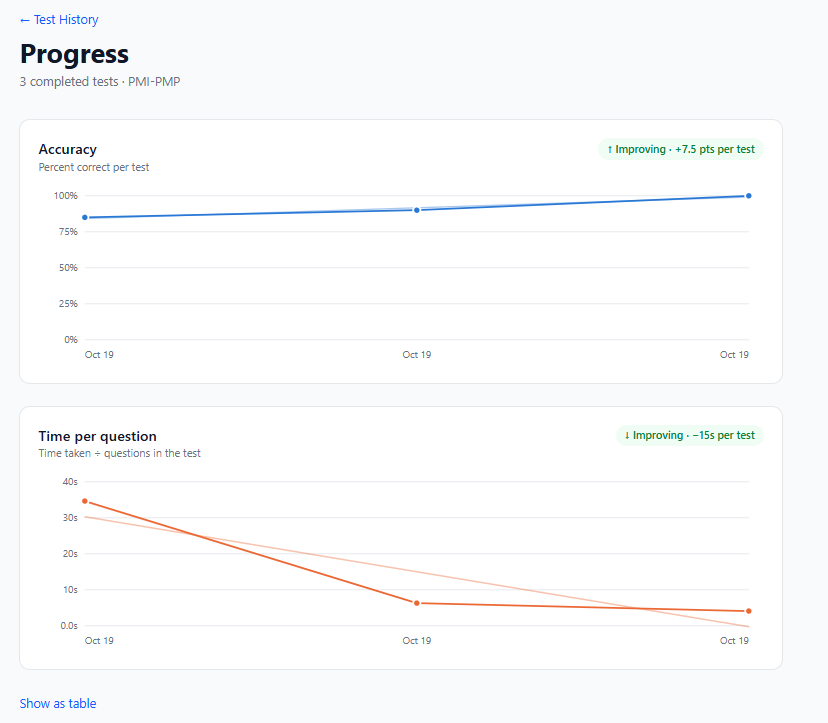
Progress charts: your score and time per question across tests, each with a trend.
Start free
Every exam has a free set of 20 questions you can take without an account. They're scored in your browser and come with explanations at the end, so you can see how the practice works before you commit.
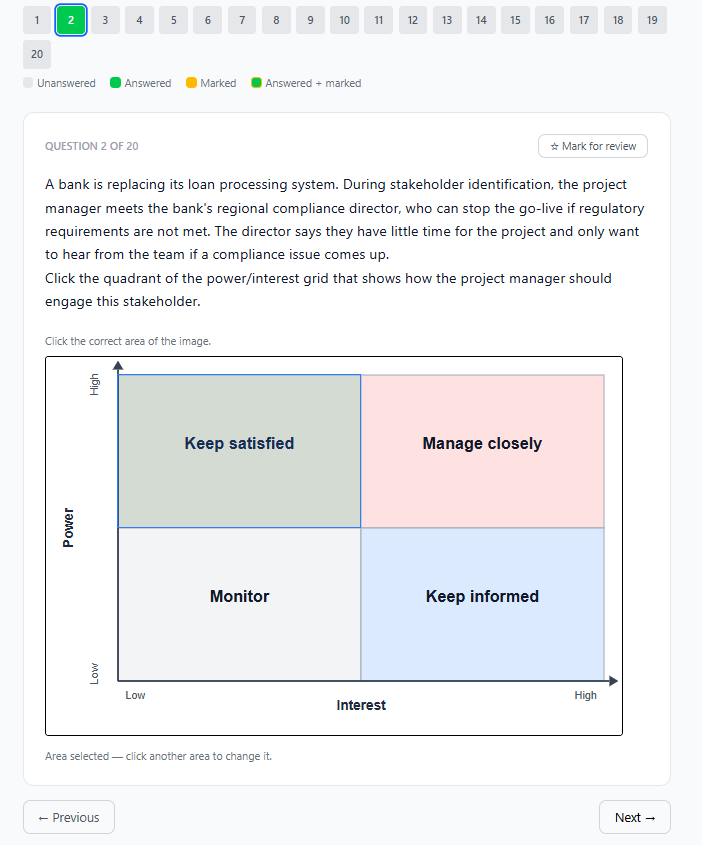
A hotspot question from the free PMP set: click the part of the image that answers the question.
For training providers
If you run a course, you can give a whole class access at once. Each student gets an email invitation, signs in, and finds their exam ready to practice.
Frequently asked questions
Is Exam Ascent free?
You can try 20 questions for each exam free, with no account. Full access to an exam's practice tests comes with an access pass for that exam.
Which exams can I practice for?
The Project Management Professional (PMP), AWS Professional-level certifications and the Claude Certified Architect – Professional. Each exam has its own page with the exam format, what it covers and a free set of questions.
How is practice scored?
Each question is all-or-nothing: you only get credit when every part of your answer is right. In Exam mode you see your score and every explanation when you submit; in Study mode you check each answer as you go.
Can I use Exam Ascent on my phone?
Yes. It works in any modern browser on a phone, tablet or computer, with nothing to install.
What happens if my internet drops during a test?
Keep answering. Your answers are kept on your device and saved automatically as soon as you're back online, even if you close the tab in the meantime. You'll see a banner while you're offline.
Is Exam Ascent connected with PMI, AWS or Anthropic?
No. Exam Ascent is an independent practice site. It isn't affiliated with, endorsed by or sponsored by any exam provider.
Can a training provider buy access for a class?
Yes. Access can be set up for a whole class at once, and each student signs in from an email invitation.